
Information Regarding Certificate of Completion
Your certificate is found at the end of the course material in the last section. You will be asked to input your name and generate your certificate. You may print it off or save it as a pdf.
If the certificate of completion did not appear at the end of the course under “That’s a Wrap!”, it means you have missed some course material. Navigate back to your course and look at the course menu. Any completed section shows a green circle with a black check mark inside. Incomplete material will not have this check.
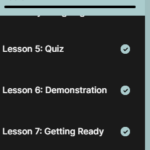
You may return to the course material as many times as you wish upon completion. You can use this menu to navigate through the course material.